
SmartPatch NX6440

Four radios. Any band. One network.

SmartPatch turns the vehicle into the communications hub for the people who walk away from it. Their portable radio reaches everything the vehicle can reach: other radios, other bands, the mesh, cellular and the control room. When someone is in trouble, the alarm gets through.

Book a demonstration Download the PDF

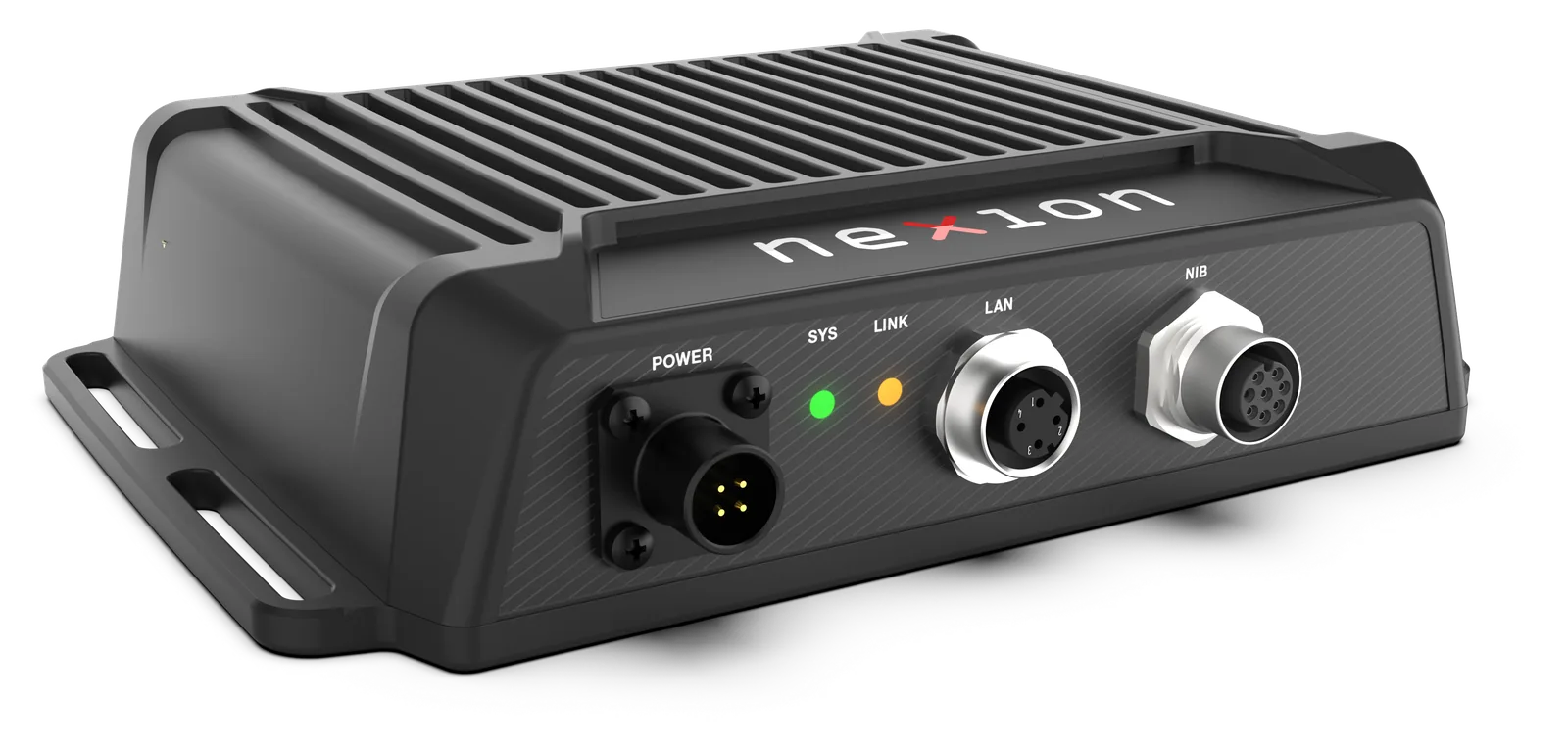
SmartPatch NX6440, front three-quarter view

The radio stays in the vehicle. The people don't.

Crews in remote and rural Australia work away from their vehicles. A portable radio is light enough to carry, but its range stops a long way short of the control room, and it can't talk to the other agency's radios, the mesh network or a mobile phone.

The vehicle can reach all of those. It carries the high-power mobiles, the HF radio and the cellular router. SmartPatch connects them, so the vehicle relays for the person on foot.

Vehicle as a Node, in one box

How SmartPatch works A field operative's portable talks to a vehicle radio. In the vehicle, SmartPatch connects up to four radios, the mesh and IP handsets, and the cellular router, which carries a secure tunnel to the cc.nexion.au console in the control room. A red path shows the emergency: portable button to SmartPatch to the beacon and the console. Field operative portable radio The vehicle VHF/UHF mobile Portable link Digital HF Any-band radio SmartPatch Mesh +IP handsets Cellularrouter beacon secure tunnel cc.nexion.au Control room Emergency button
Your portable reaches everything the vehicle can reach.

Four things that set SmartPatch apart

What it does

Interoperability

Mixed fleets, one network.

Connect up to four transceivers (digital HF, VHF/UHF mobiles, portables, or any radio with PTT, busy and line audio) and SmartPatch cross-connects them automatically. When one radio receives, the others transmit. A routing engine decides who has the channel and blocks the feedback loops that plague conventional patches.

  • Four transceiver ports, analogue audio end-to-end, any-to-any routing
  • First-signal-wins channel lock, hang timers, 90 s time-out and transmit-tail lockout. On the bench: 7 false keys in 7 overs reduced to 0 in 8.
  • Remote control from your portable (channel follow).* Change channel on your portable and the vehicle follows you. A field user can steer the vehicle's link, for example from LMR to mesh to cellular, without going back to the vehicle.
  • Codan Envoy X2 control. Serial control, link supervision and remote power of the long-range digital HF transceiver, from the browser and with the ignition.
  • Serial control and link supervision of VHF/UHF radios. Anything else runs driverless.
  • Three ways to detect receive on each port: wired busy, serial status or voice-operated
  • Caller identification. The unit ID of the radio that is talking is shown on the dashboard and on cc.nexion.au (P25 radios).
IP and remote

Your vehicle, on the control-room screen.

Two independent IP audio channels put mesh networks, IP handsets and the cc.nexion.au console on the same footing as a radio. The console shows every connected vehicle, what its radios are doing and how healthy it is. A controller can talk straight onto the vehicle's radios from a browser, over the vehicle's own cellular link.

  • SIP phone patch. A phone call bridged to the radio user. SmartPatch announces the caller on air and the user answers with PTT. Phone speech goes out in short overs, so the radio user can always break in.
  • Two IP audio channels, routable like any radio port
  • Bridges an IP mesh network's voice group to any radio, with a live list of every mesh radio heard
  • cc.nexion.au console. An encrypted tunnel that the vehicle dials out (no inbound internet ports needed), two-way audio, keying of the vehicle radios from the page, caller ID and device status.
  • Device dashboard. Click any radio, router or gateway card for live detail. The same view appears on cc.nexion.au.
  • Router and cellular status. Signal bars, operator, SIM and connection state of the vehicle's router.
  • An optional public status panel on the login page: unit health only, with no locations, numbers or names

In development, available Q1 2027

  • IP handsets (rugged push-to-talk phones) as radio endpoints

Safety

The alarm gets through.

Press the emergency button on a portable and SmartPatch raises a latched alarm in the vehicle: a flashing red beacon, a banner on the dashboard and an alert on the cc.nexion.au console, showing which radio raised it. The alarm survives a power cut and stays until it is acknowledged. SmartPatch was designed emergency-first.

  • Radio emergency from the portable's emergency button. Latched alarm, a red beacon in the vehicle, a dashboard banner and caller ID.
  • GPS tracking of field portables.* Each field radio on the map with its distance and bearing from the vehicle. The person in distress is marked in red.

In development, available Q1 2027

  • Emergency alert and acknowledgement on the cc.nexion.au console
  • Emergency raised by voice: say “emergency” three times on the speech channel
  • Geofence zones on the map, display-only preview

Voice

It speaks your language.

SmartPatch speaks on air in a natural voice. It reads incoming text messages to the field team, confirms voice commands, and at power-up tells the crew whether its self-test passed and whether every device and the control room are connected, before anyone opens a laptop. All speech runs inside the box: no cloud, no internet.

  • Text-to-speech announcements on any radio
  • SMS read-out. An incoming text from an allowed number is announced and read out on air when the channel is quiet.

In development, available Q1 2027

  • Voice commands. A small, fixed set of spoken commands on the speech channel, for example raising the emergency alarm or switching vehicle accessory outputs.
  • Spoken power-up status. Self-test result, “all local devices connected” (naming any that are missing) and control room connected. The customer sets the wording.
  • Speech-to-text transcripts of radio traffic on screen

Built for the vehicle

Bolts into a LandCruiser, not a rack.

Under 4 watts from vehicle power, −20 to +60 °C, industrial M12 connectors. SmartPatch knows when the ignition is off: it holds on for a set time, then powers the radios and itself down in order. Software installs are power-cut-safe: pull the power at any moment and the unit comes back on the last good version.

  • Ignition power management: hold-up timer with a status-light indication, ordered shutdown of the radios, including HF
  • Power-cut-safe installs with automatic fallback, proven by repeated real power pulls
  • Status at a glance: green after a healthy self-test, white while connected to the control room
  • Power-on hardware self-test. Any failed part is named on the dashboard.
  • Built-in GNSS, plus a fixed or last-known position when there is no sky

Commissioning

Prove every audio path before you leave site.

A live oscilloscope, tone generator, DTMF injection and per-port level meters, all in the browser and served by the unit itself. Commission the install without a service monitor in the vehicle.

  • Scope, tone, DTMF and level meters
  • Radio inventory: model and serial of each attached radio, vehicle ID and a stock-take export
  • HTTPS-only web interface, PIN login, no default credentials, no cloud dependency
  • 90-second auto-revert of configuration changes

See it live

The cc.nexion.au console shows the vehicle, its radios and its health. Listen to the radios and talk onto them from a browser, over the vehicle's own cellular link.

Open the console Book a demonstration

  • See each radio's state and the unit ID of whoever is talking
  • Talk onto the vehicle's radios from the browser
  • Receive and acknowledge a radio emergency

Built for

Multi-agency emergency response
One network across services' radios and the control room.
Mining and resources
Crews at remote sites connected to the camp and to emergency help.
Pastoral and agriculture
Long distances, patchy coverage, one vehicle as the hub.
Remote infrastructure
Utilities, rail and road crews working far from towers.
Defence and government
Mixed bands and brands, controlled from one console.

Specifications

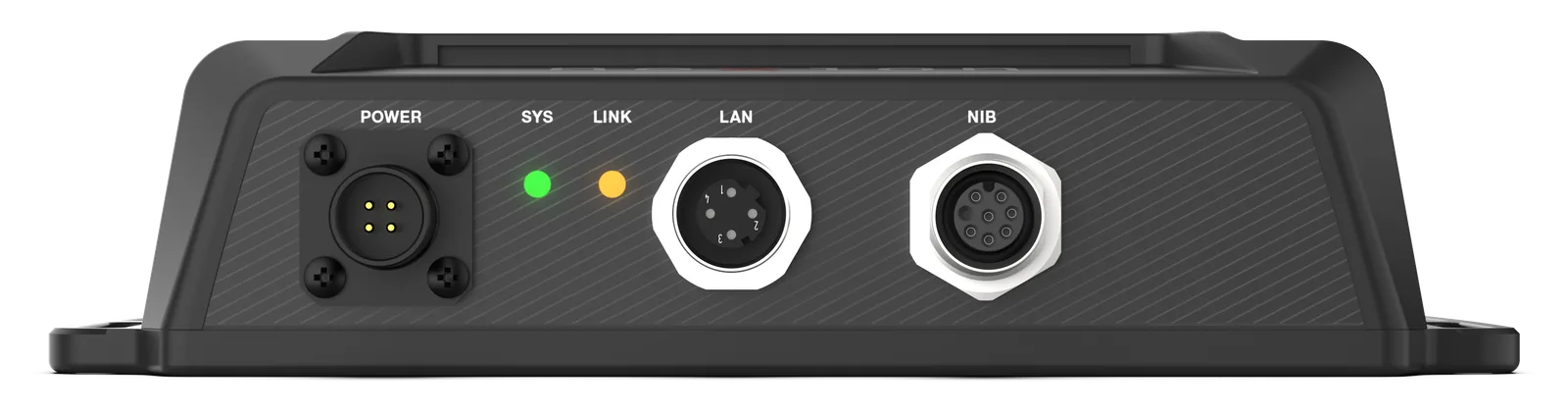
SmartPatch front: POWER, SYS and STATUS lights, LAN and NIB connectors
Front: POWER, SYS and STATUS lights, LAN, NIB
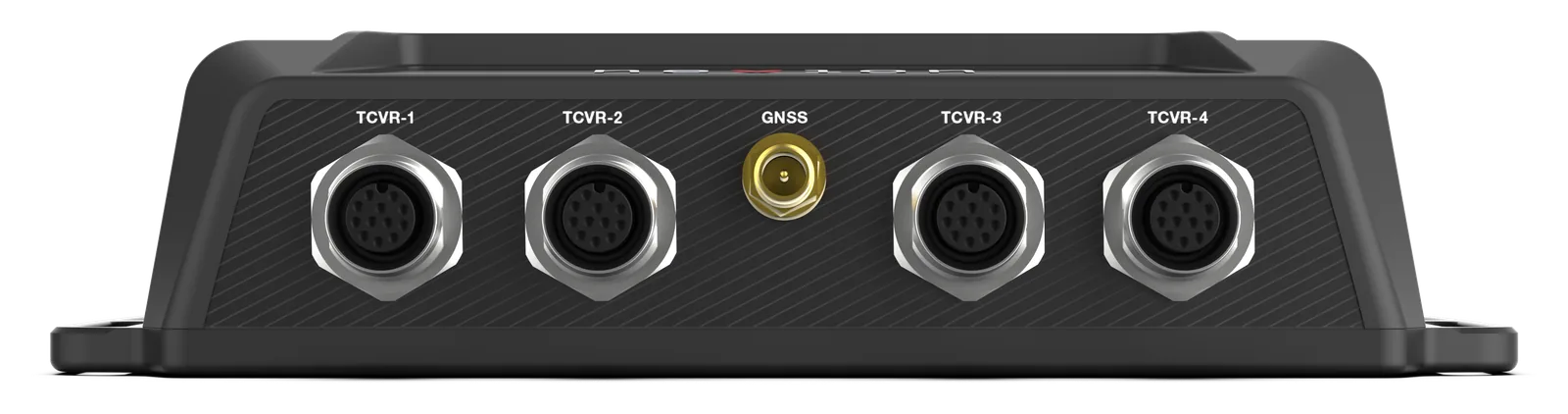
SmartPatch back: TCVR-1, TCVR-2, GNSS, TCVR-3 and TCVR-4 connectors
Back: TCVR-1, TCVR-2, GNSS, TCVR-3, TCVR-4
Size / weight182 × 42 × 135 mm excl. connectors; 880 g without cables
Power10–16 V DC, < 4 W, ignition sensing, power hold-off
Environment−20 to +60 °C (extended available); 95 % RH non-condensing
Transceiver ports4 × industrial M12-12: balanced 600 Ω in, unbalanced 600 Ω out, −20 to +6 dBm (−10 dBm nom.), PTT active low, BUSY active high/low, RS232, switched 12 V radio power (latched or momentary)
Serial control4 × RS232, or 3 × RS232 + 1 USB
Audio path8 × 8 analogue crosspoint, end-to-end analogue; DSP pre/de-emphasis, flat audio, DTMF
System interfacesEthernet (M12-4), Nexion Interface Bus expansion (M12-8), 2 × GPIO, GNSS (SMA)
ComputeNXP i.MX8M-Mini quad-core 64-bit; hardened Debian Linux
GNSSu-blox M8, 72-channel GPS/GLONASS, −167 dBm, < 30 s cold start (open sky), antenna open/short monitor
ManagementHTTPS web UI on board; cc.nexion.au console (optional)
Firmware2.0 (October 2026 build)

Roadmap

On the platform, not in the current firmware. Do not rely on roadmap items for procurement.

  • Roadmap

    Interface to Motorola APX and DP series transceivers

  • Roadmap

    Automatic bearer selection and failover across cellular, satellite and HF

  • Roadmap

    HF automatic link establishment (ALE) calling to HQ, routed automatically

  • Roadmap

    Browser firmware update, NTP, syslog, fleet-wide encrypted configuration profiles

  • Roadmap

    Vehicle handset with colour display

  • Roadmap

    Active geofence alerts

Ways to buy

Buy and self-manage
Full documentation, configuration support and training from Nexion Solutions.
Managed service
A service provider owns, maintains and supports the units for a recurring fee.
Multi-agency or consortium
Agencies sharing a region share bearer costs, with independent radio channels and emergency workflows.

Evaluation units and integration support for fleet operators, integrators and radio dealers.